
The Hidden Cost of Technical Debt: How Businesses Can Modernize Legacy Software Without Disruption
The Hidden Cost of Technical Debt: How Businesses Can Modernize Legacy Software Without Disruption
As businesses grow, their software needs change. An application that
once supported a small team may eventually need to handle thousands of
users, complex workflows, multiple integrations, and increasing data
volumes. However, the technology behind that application does not
always evolve at the same pace.
Over time, quick fixes, outdated dependencies, duplicated code, and
architectural limitations can make software harder and more expensive
to maintain. These problems are commonly associated with technical
debt, and their effects often extend beyond the development team.
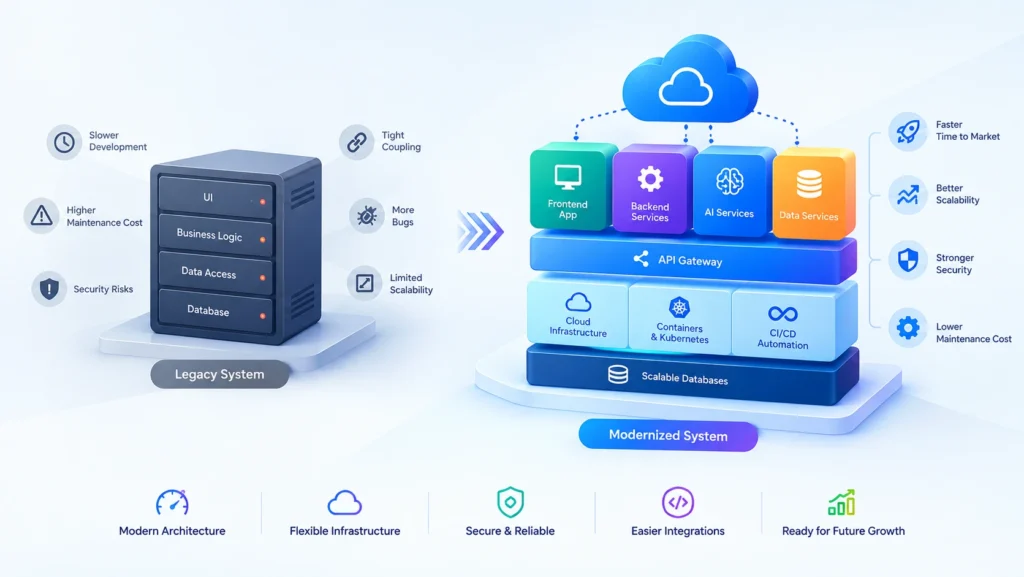
Modernizing an existing system can improve reliability, development
speed, security, and scalability. The challenge is choosing the right
changes without disrupting daily operations or investing in a complete
rebuild that the business does not actually need.
What Is Technical Debt?
Technical debt refers to the future cost of maintaining or changing
software when earlier implementation decisions create additional
work. It can result from shortcuts, outdated technologies, missing
documentation, insufficient testing, or architectural decisions that
no longer fit the business.
Not every shortcut creates harmful technical debt. A deliberate
trade-off can help a company validate an idea or launch a product
quickly. The problem occurs when temporary decisions become permanent
and the cost of maintaining them continues to grow.
For example, a startup may initially build its application around a
single database and a small number of tightly connected modules.
That approach may be perfectly reasonable in the early stages.
As the product expands, however, changes to one module may begin
affecting several others, making new features slower to deliver.
The goal is not to eliminate every imperfection in the codebase.
It is to manage technical debt so that it does not prevent the
business from meeting its operational and product goals.
How Technical Debt Affects Business Growth
1. New Features Take Longer to Deliver
When software has unclear dependencies or inconsistent architecture,
developers must spend additional time understanding existing behavior
before making changes. A feature that should be straightforward may
require updates across multiple unrelated components.
This slows product development and makes it harder for businesses to
respond to customer feedback, market opportunities, and changing
requirements.
2. Maintenance Costs Continue to Increase
Older systems may rely on unsupported libraries, outdated frameworks,
manual deployment procedures, or specialized knowledge held by only
a few team members. Maintaining these systems can require more effort
with each passing year.
The total cost includes more than developer hours. Businesses may
also face longer release cycles, expensive workarounds, operational
interruptions, and increasing difficulty recruiting developers with
relevant experience.
3. Reliability Becomes Harder to Maintain
In tightly coupled applications, a change intended to fix one issue
can introduce unexpected behavior elsewhere. If automated tests and
monitoring are limited, these problems may not be discovered until
customers encounter them.
Frequent incidents can reduce customer confidence and force
development teams to spend time fixing existing problems instead of
improving the product.
4. Security and Compliance Risks Increase
Unsupported software components may no longer receive security
updates. Legacy applications may also use outdated authentication
methods, broad database permissions, or inconsistent access controls.
Businesses should regularly assess dependencies, patching practices,
access permissions, and data protection requirements. Modernization
provides an opportunity to address these weaknesses, although simply
moving an application to newer infrastructure does not automatically
make it secure.
5. Integrations Become More Difficult
Modern businesses often need their software to communicate with
payment providers, CRM platforms, reporting tools, mobile
applications, and external APIs.
Legacy systems may lack well-defined interfaces or depend on outdated
integration methods. As a result, connecting a new service can
require custom workarounds that introduce even more complexity.
When Should a Business Modernize Its Software?
Older software does not automatically need to be replaced. A stable
application that meets business requirements may continue to deliver
value for years. The decision should be based on measurable problems
rather than the age of the technology alone.
Modernization deserves serious consideration when:
- Routine changes repeatedly cause unexpected defects.
- New features take significantly longer than expected.
- Critical frameworks or dependencies are no longer supported.
- Performance problems affect customers or employees.
- Integrations require increasingly complicated workarounds.
- Deployment and recovery procedures depend heavily on manual work.
- The system cannot support important business or regulatory requirements.
- Maintenance costs are preventing investment in new product capabilities.
Before making a major investment, teams should identify the root
causes of these problems. Sometimes targeted improvements can resolve
them. In other cases, deeper architectural changes may be justified.
Four Strategies for Modernizing Legacy Software
1. Refactor the Existing Application
Refactoring improves the internal structure of software while
preserving its existing behavior. It can involve removing duplicated
code, simplifying complex functions, separating responsibilities,
improving naming and documentation, or adding automated tests.
This approach is useful when the current technology remains suitable
but the codebase has become difficult to maintain.
Refactoring can often be completed incrementally, allowing businesses
to improve maintainability without replacing the entire application.
Changes should be supported by tests and delivered in manageable
stages.
2. Upgrade Frameworks and Dependencies
Applications built on older frameworks may face compatibility issues,
security concerns, and limited access to modern tooling.
Upgrading to supported versions can improve maintainability and make
future development easier.
However, framework upgrades should include compatibility checks,
dependency reviews, regression testing, and a deployment plan.
Some upgrades are relatively straightforward, while others require
significant code changes.
Teams should prioritize components based on security exposure,
business importance, support status, and the effort required to
upgrade them.
3. Modernize the Architecture in Stages
When an application has become tightly coupled, teams can gradually
separate its responsibilities rather than rebuilding everything
simultaneously.
For example, a business might begin by extracting reporting,
notifications, or document processing into separate components.
The existing application can continue handling its core workflows
while the new components are introduced and validated.
A modular monolith can be an effective intermediate step. It creates
clear boundaries within one deployable application without introducing
all the operational overhead associated with microservices.
Independent services should be introduced when there is a clear
reason, such as separate scaling requirements, deployment needs, or
team ownership. More services do not automatically produce better
software.
4. Replace the System When Incremental Changes Are No Longer Enough
In some cases, the existing system has fundamental limitations that
make continued investment impractical. Its data model, architecture,
security requirements, or business logic may be incompatible with
the product’s future direction.
Replacing the system may then be the better long-term option.
However, a complete rebuild introduces risks, including missed
requirements, migration errors, unexpected costs, and delays.
Businesses should compare the long-term cost and risk of maintaining
the existing application against the cost and risk of replacement.
The decision should account for migration complexity, business
continuity, and the time required to deliver equivalent functionality.
How to Modernize Software Without Disrupting Operations
Modernization is not only a technical exercise. Existing software
often supports important business processes, so changes must be
planned around customers, employees, and operational requirements.
Step 1: Audit the Current System
Start by documenting the application’s architecture, dependencies,
integrations, database structure, deployment process, and critical
business workflows.
Identify the components that create the greatest maintenance burden
and the areas where failure would have the largest business impact.
This provides a foundation for prioritizing work.
Step 2: Define Measurable Objectives
Avoid modernization projects with vague goals such as making the
software more modern. Define the outcomes the business expects.
Depending on the application, useful measures may include:
- Time required to deliver a typical feature.
- Frequency of production incidents.
- Application response times and error rates.
- Deployment frequency and recovery time.
- Maintenance effort and infrastructure costs.
- Time required to integrate a new business service.
Record baseline measurements before making changes so the team can
determine whether the modernization is producing the intended value.
Step 3: Prioritize High-Impact Improvements
Not every technical problem needs immediate attention. Prioritize
work according to business impact, security exposure, likelihood of
failure, maintenance cost, and implementation effort.
A small but frequently modified module may deserve attention before
a large component that rarely changes and operates reliably.
Step 4: Introduce Changes Incrementally
Divide the modernization into smaller releases with clear acceptance
criteria. Where appropriate, introduce new components alongside the
existing system and move selected workflows gradually.
Feature flags, controlled rollouts, automated tests, and rollback
procedures can reduce deployment risk. The exact approach depends on
the system’s architecture and operational requirements.
Step 5: Protect and Validate Business Data
Database changes often present some of the highest risks during
modernization. Teams should verify backups, test restoration
procedures, validate migration results, and plan how to handle
interrupted or partially completed migrations.
For critical applications, a migration rehearsal and a clearly
documented recovery plan can help prevent avoidable disruption.
Step 6: Monitor Results After Every Release
Track application health, errors, performance, and user feedback
after each release. Compare the results with the original baseline
and investigate unexpected changes before expanding the rollout.
This feedback loop helps teams make evidence-based decisions and
adjust the modernization plan as new information becomes available.
The Role of Cloud Infrastructure and DevOps
Cloud infrastructure and DevOps practices can support software
modernization, but they are not substitutes for sound application
design.
Cloud platforms provide options for scaling compute resources,
managed databases, storage, networking, and application services.
Businesses can choose the services that match their workloads,
reliability requirements, and budgets.
Automated build and deployment pipelines can make releases more
repeatable. Infrastructure as code can help teams manage environments
consistently, while monitoring and centralized logging make it easier
to investigate operational problems.
Containers may also improve deployment consistency when they fit the
application’s needs. However, adopting containers, Kubernetes, or
multiple cloud services without a clear operational benefit can
introduce unnecessary complexity.
The best modernization strategy aligns the application architecture,
deployment process, infrastructure, and team capabilities.
How to Prevent Technical Debt From Building Up Again
Modernization will have limited long-term value if the development
practices that created the original problems remain unchanged.
Businesses need a sustainable approach to maintaining software
quality as the product evolves.
-
Establish coding standards: Maintain consistent
conventions and clear architectural boundaries. -
Automate testing: Protect important workflows with
unit, integration, and regression tests. -
Review dependencies: Track outdated packages,
security advisories, and support timelines. -
Improve documentation: Record important design
decisions, operational procedures, and system dependencies. -
Reserve time for maintenance: Include technical
improvements in normal planning rather than postponing them
indefinitely. -
Measure engineering outcomes: Evaluate reliability,
delivery speed, and maintainability rather than focusing only on
the number of features released.
Technical debt should be treated as an ongoing engineering concern,
with priorities based on risk and business value. It does not need
to be eliminated all at once to be managed effectively.
Conclusion
Technical debt can quietly limit business growth by increasing
maintenance costs, slowing product development, creating reliability
problems, and making new integrations more difficult.
The solution is not always a complete rewrite. In many cases,
refactoring, framework upgrades, better testing, and targeted
architectural improvements can deliver meaningful benefits.
More extensive replacement may be justified when the existing
system can no longer meet important business requirements.
Successful modernization starts with understanding the current
system, identifying the most important problems, and connecting
technical decisions to measurable business outcomes. By making
changes incrementally and validating each stage, organizations can
improve their software while protecting the operations that depend
on it.
The goal is to build and maintain software that supports the
business today while remaining adaptable to future requirements.
Modernize Your Software With Expoders
Is your existing application becoming difficult to maintain, scale,
or extend? The right modernization strategy can help you address
technical limitations without introducing unnecessary complexity
or risk.
Expoders provides custom software development and engineering
solutions to help businesses build, improve, and maintain
applications aligned with their goals.
Visit Expoders to explore our software development services.