
Why Software Modernization Should Start With Business Bottlenecks, Not a New Tech Stack
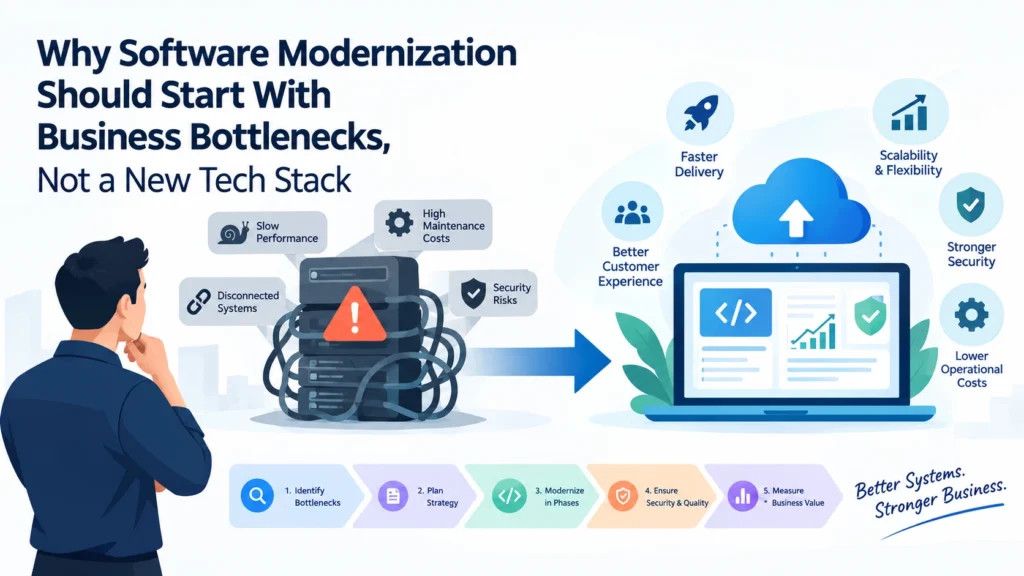
Why Software Modernization Should Start With Business Bottlenecks, Not a New Tech Stack
Businesses rarely decide to modernize their software without a reason. Sometimes, a growing customer base exposes performance problems. In other cases, teams spend too much time maintaining existing applications, integrating disconnected systems, or working around limitations that prevent the business from moving forward.
The common response is to consider a new technology stack, migrate everything to the cloud, or rebuild the application from scratch.
Successful software modernization starts with understanding what is holding the business back, not choosing the latest technology.
In 2026, businesses have more options than ever for building and maintaining digital products. Cloud infrastructure, AI-assisted development, modern frameworks, and automation can improve how software is delivered. However, these technologies create value only when they address a genuine operational or business need.
This guide explains how organizations can identify the right modernization opportunities, make informed technical decisions, and improve existing systems without introducing unnecessary complexity.
What Is Software Modernization?
Software modernization is the process of improving existing applications, architecture, infrastructure, and development practices so that technology continues to support changing business requirements.
It does not always mean replacing an entire application.
Depending on the situation, modernization may involve:
- Improving application performance and reliability.
- Refactoring difficult-to-maintain code.
- Replacing outdated frameworks or unsupported dependencies.
- Connecting disconnected business applications through APIs.
- Moving suitable workloads to cloud infrastructure.
- Automating manual workflows and repetitive operations.
- Improving security, monitoring, and deployment processes.
- Introducing AI capabilities where they deliver measurable value.
The right approach depends on the problems a business needs to solve.
For example, a company struggling with slow reporting might benefit more from improving its database queries and data architecture than rebuilding its entire customer relationship management platform.
Similarly, an organization experiencing frequent deployment failures might need automated testing and a more reliable CI/CD pipeline rather than a completely different programming language.
Modernization should be driven by business priorities, with technology decisions following from them.
1. Identify the Business Bottlenecks First
Before selecting a framework, cloud provider, or architecture, identify where the existing software creates friction.
Technical problems often appear as business problems.
A sales team might be unable to access accurate customer information because its CRM and finance systems do not communicate. Operations employees might manually transfer information between applications. A growing SaaS product might experience performance issues whenever customer activity increases.
These situations have different causes and require different solutions.
Common Warning Signs
Slow feature delivery
If adding a relatively simple feature requires extensive investigation, multiple workarounds, or changes across unrelated parts of the application, the architecture may be creating unnecessary complexity.
Increasing maintenance costs
When developers spend more time fixing recurring issues than delivering improvements, technical debt may be affecting the team’s productivity.
Disconnected systems
Duplicate data entry, inconsistent records, and manual reporting often indicate that business applications need better integration.
Performance problems
Slow page loads, delayed reports, failed background jobs, and database bottlenecks can affect customer satisfaction and operational efficiency.
Limited scalability
An application that works well for a small customer base may struggle when transaction volumes, concurrent users, or data requirements increase.
Security and compliance concerns
Unsupported dependencies, outdated authentication mechanisms, and insufficient monitoring can create risks that become harder to address as a system grows.
The goal is to connect each technical issue to a business outcome. That makes it easier to prioritize work and explain why modernization deserves investment.
2. Understand the Difference Between Technical Debt and Outdated Technology
An older technology stack is not automatically a problem.
Many mature applications continue to deliver business value because their architecture is stable, their performance is acceptable, and their maintenance requirements are manageable.
The greater concern is technical debt: the accumulated cost of shortcuts, architectural decisions, duplicated logic, outdated dependencies, and workarounds that make future changes more difficult.
For example, an application built with an older framework might be reliable and inexpensive to operate. Replacing it simply because a newer framework exists may offer little immediate value.
By contrast, a modern application can still have significant technical debt if it contains tightly coupled components, inconsistent business logic, inadequate automated tests, or poorly documented integrations.
Businesses should evaluate software based on its condition and business impact rather than its age alone.
A useful assessment should examine:
- How difficult it is to implement new features.
- How frequently defects occur after releases.
- How much engineering time goes into maintenance.
- Whether dependencies receive security updates.
- How reliably the application handles increasing workloads.
- Whether the system can support planned business changes.
This assessment provides a stronger foundation for deciding what needs to change.
3. Choose the Right Modernization Strategy
Once the main bottlenecks are understood, the next step is selecting an approach that addresses them without introducing unnecessary risk.
Refactoring
Refactoring improves the internal structure of existing software while preserving its intended behavior.
It is useful when the application remains valuable but its code has become difficult to maintain, test, or extend.
Typical improvements include simplifying complex functions, reducing duplication, separating business logic from infrastructure, and improving automated test coverage.
Replatforming
Replatforming moves an application to a more suitable runtime or infrastructure environment with limited changes to its core architecture.
This can help organizations address infrastructure limitations or operational requirements without undertaking a complete rebuild.
However, moving to the cloud does not automatically make an application faster, cheaper, or more scalable. Architecture, workload characteristics, security, and operating costs still matter.
Re-architecting
Re-architecting changes how an application is structured to address deeper limitations.
For example, a monolithic application may need clearer module boundaries or independently deployable services as the organization grows.
Microservices can be useful when different components have distinct scaling, deployment, or ownership requirements. They can also introduce additional operational complexity.
A modular monolith may be a better choice for a smaller team or a product that does not yet need independently deployed services.
Rebuilding Selected Components
Sometimes, replacing a specific module is more practical than refactoring it.
A company might replace an outdated reporting engine, introduce a modern authentication service, or rebuild a customer-facing interface while retaining the business logic and data systems that already work.
This targeted approach can deliver improvements without putting the entire application at risk.
Full Replacement
A complete rebuild may be justified when the existing system cannot reasonably support essential business requirements, security needs, or future operations.
However, it requires careful planning because undocumented business rules, historical data, integrations, and user workflows can be difficult to reproduce.
The best strategy is the one that resolves the identified problem at an acceptable cost and level of risk.
4. Modernize in Phases Instead of Replacing Everything at Once
Large software replacement projects can become expensive when teams attempt to change too many components simultaneously.
A phased approach allows businesses to validate assumptions, learn from early results, and reduce disruption.
Stage 1: Assess the Current System
Document the architecture, integrations, dependencies, infrastructure, security concerns, and operational limitations.
Interview the people who use and maintain the software. They often understand the real bottlenecks better than technical documentation alone can reveal.
Stage 2: Prioritize Opportunities
Rank problems according to business impact, urgency, implementation effort, and risk.
For example, resolving a security vulnerability or a recurring production failure may take priority over replacing an older user interface.
Stage 3: Define Measurable Outcomes
Establish a baseline before development begins.
Depending on the project, useful measurements may include:
- Average application response time.
- Time required to release a feature.
- Production incident frequency.
- Deployment failure rate.
- Manual processing time.
- Infrastructure and maintenance costs.
These measurements make it possible to evaluate whether modernization is delivering the intended results.
Stage 4: Implement a Controlled Improvement
Start with a well-defined component, workflow, or technical problem.
Introduce automated tests, monitoring, rollback procedures, and appropriate security controls. Where practical, validate the changes with a limited group of users before expanding the rollout.
Stage 5: Measure and Expand
Compare results against the original baseline. If the changes deliver the expected improvement, use the lessons learned to guide the next phase.
This creates a repeatable process rather than a single high-risk transformation.
5. Build Security, Testing, and Deployment Into the Plan
Modernization should improve reliability, not simply change how an application looks or where it runs.
Security and quality checks need to be part of the development process from the beginning.
Automated testing helps teams identify regressions before changes reach production. Continuous integration and continuous delivery pipelines make deployments more consistent and repeatable. Monitoring provides visibility into application behavior, infrastructure performance, and unexpected failures.
Infrastructure as code can also help teams manage cloud resources consistently across development, staging, and production environments.
For business-critical systems, teams should additionally plan for:
- Database backups and recovery testing.
- Access controls and secrets management.
- Dependency and vulnerability scanning.
- Performance testing under realistic workloads.
- Logging, alerting, and incident response.
- Data migration validation.
- Rollback or recovery procedures.
These practices are especially important when modernization involves customer information, financial transactions, healthcare data, or other sensitive business operations.
A successful modernization project should leave the organization with a system that is easier to operate, monitor, secure, and improve.
6. Use AI Where It Solves a Real Problem
AI-assisted development and AI-powered business features are increasingly available, but not every modernization project needs them.
AI tools can help developers understand unfamiliar codebases, generate documentation, assist with test creation, and identify potential areas for refactoring. Human review and automated validation remain important because generated changes can introduce defects or misunderstand existing business rules.
AI can also improve business applications through document processing, customer support, information retrieval, and workflow automation.
The important question is not whether AI can be added. It is whether the capability improves a specific workflow enough to justify its cost, complexity, and risks.
Before introducing an AI feature, organizations should assess data quality, privacy, security, expected accuracy, operating costs, and the consequences of incorrect outputs.
Start with a clearly defined use case, measure its results, and expand only when the evidence supports doing so.
7. Measure Business Value, Not Just Technical Progress
A modernization project can successfully migrate an application and still fail to deliver meaningful business improvements.
For example, moving a system to a new infrastructure platform is a technical milestone. Whether that change reduces operational costs, improves reliability, or enables faster product development is a separate question.
Businesses should evaluate modernization through both technical and operational measures.
| Business Objective | Example Measurement |
|---|---|
| Improve customer experience | Response time and task completion rate |
| Accelerate product delivery | Time from development to production |
| Reduce maintenance effort | Engineering hours spent on recurring issues |
| Improve reliability | Incident frequency and recovery time |
| Reduce manual work | Processing time per transaction |
| Improve operational efficiency | Total cost of ownership |
| Support business growth | Capacity under increasing workload |
The right measurements depend on the organization and its starting point. Establish realistic targets before implementation rather than assuming that modernization will automatically improve every metric.
Regular reviews also help decision-makers identify work that should be adjusted, delayed, or stopped.
Common Software Modernization Mistakes to Avoid
Even well-funded projects can struggle when the underlying business problem is not clearly defined.
Replacing everything at once. Large rewrites increase the number of moving parts and can delay the delivery of business value.
Choosing technology before defining requirements. A popular framework or architecture may not fit the team’s size, product maturity, or operating needs.
Ignoring existing business rules. Legacy systems often contain years of accumulated operational knowledge that may not be documented elsewhere.
Underestimating data migration. Moving data involves more than copying records. Relationships, validation rules, historical information, and reporting requirements must remain consistent.
Neglecting user adoption. Even technically sound improvements can fail if they disrupt established workflows without adequate communication or training.
Measuring activity instead of outcomes. Counting migrated services or completed development tasks does not establish whether the business is better off.
Avoiding these mistakes requires collaboration between business stakeholders, developers, operations teams, and the people who depend on the software every day.
Conclusion: Modernize With a Clear Business Purpose
Software modernization is not a race to adopt the newest framework, architecture, or cloud platform. It is a structured way to remove the technical limitations that prevent a business from operating efficiently and growing with confidence.
The most effective approach begins by identifying bottlenecks, understanding technical debt, choosing an appropriate modernization strategy, and improving the system in manageable phases.
Every investment should have a clear purpose, whether that means reducing maintenance effort, improving application performance, strengthening security, connecting business systems, or enabling new product capabilities.
For growing businesses, the objective is not to replace technology simply because it is old. It is to build a reliable technical foundation that can adapt as business needs change.
At Expoders, we believe software decisions should be guided by business outcomes. Whether an organization needs to improve an existing application, modernize its architecture, integrate disconnected systems, or build a new digital product, the right starting point is understanding the problem that needs to be solved.
If your existing software is slowing down development or creating operational challenges, the Expoders team can help you evaluate the options and plan a practical path forward.
Visit Expoders to learn more about our software development services.